


UnseenChat: View Deleted Msgs
3.924.00 Reviews
App Specs
- Version
- 24.0
- Updated On
- License
- Free
- Downloads
- 500,000+
- Developer
- Afex AI
- Categories
- Communication
- Platform
- Android
Screenshots
 Analysis by AppCompare
UnseenChat: View Deleted Msgs caught my attention because it focuses on a very specific communication problem: messages that disappear before I can read them, plus chats I would rather open without immediately showing that I have seen them. After using it, I found the appeal easy to understand. It sits beside my usual messaging apps rather than replacing them, and it tries to make missed or quietly viewed conversations easier to manage.
That narrow purpose is both its strength and its limitation. During the first few days, the app feels useful because it addresses moments that happen in ordinary conversations: someone sends a message and removes it, a notification appears while I am busy, or I want to preview a chat before deciding whether I have time to answer. Over a longer period, though, its value depends on whether those situations happen often enough to justify keeping another communication tool installed.
What the first week with UnseenChat feels like
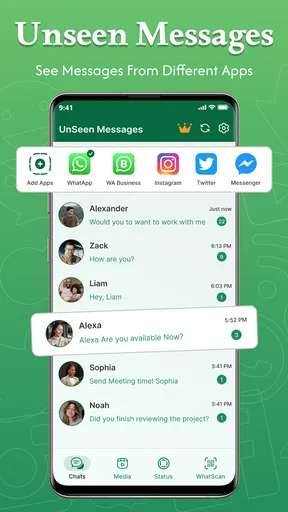
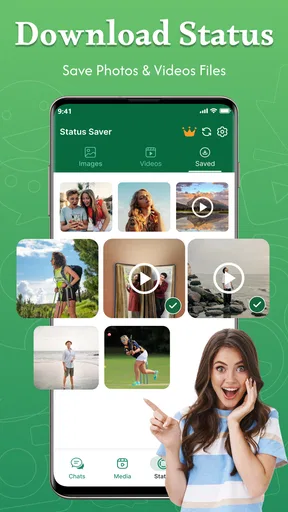
The initial experience is built around convenience rather than conversation. UnseenChat is a communication app from Afex AI, and its purpose is to help me inspect deleted messages and read chats without immediately triggering the familiar seen indication. It also includes a status-saving function, which gives it a second use beyond message previews.
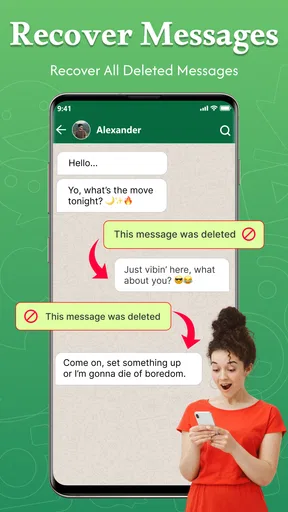
I found the concept most useful when I treated it as a buffer between receiving a message and responding to it. For example, imagine I am in a meeting and a family member sends a short message, then deletes it before I can check the notification. Later, I may want to understand what happened without asking them to resend it. In another situation, I might receive several messages from a group while I am working. A quick look can tell me whether the conversation needs an immediate reply or can wait until the evening.
That buffer can reduce pressure, but it should not be confused with a replacement for the original messaging service. The main chat still belongs to the other app, and UnseenChat works as an additional layer around incoming communication. I had to think of it less like a complete inbox and more like a viewing aid. That distinction matters because anyone expecting a full chat client, contact management, or a unified conversation history may find the experience narrower than expected.
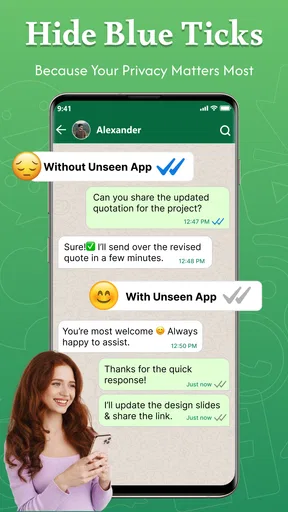
The unseen-reading function is particularly appealing to people who dislike the social obligation attached to a read receipt. Sometimes I want to understand the subject of a message before I commit to a response. A message from a colleague may require checking a calendar; a family request may need a thoughtful answer; a group chat may contain information that is useful but not urgent. Being able to inspect the conversation first gives me a little more control over my time.
There is also a practical habit that makes the app more useful: I would check it at deliberate moments instead of opening it every time a notification arrives. That keeps the tool from becoming another source of interruptions. In my experience, the benefit is greatest when I use it as a quiet review inbox, not as a second notification stream.
Worth Reading Before You Choose

EA SPORTS FC Mobile 26 Is a Bigger Football Game, but It Takes Time

Flipboard Shows What News Apps Must Do Beyond the Feed

Switching to Android Auto Means Rethinking Your Driving Routine

Google Calendar Makes a Crowded Week Easier to Manage

Ludo King Makes the Most of the Minutes Between Plans

Baby Panda World Brings Quick Play to Modern Phones, but Its Game Library Feels Busy
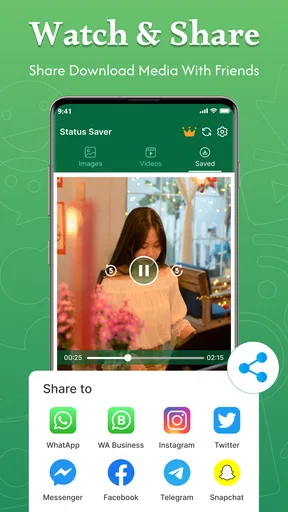
The status saver adds another reason to keep the app nearby. If I regularly want to retain a status for later viewing, having that action alongside unseen chat tools is convenient. Still, I would use it selectively. Saving everything can quickly turn a helpful feature into a clutter problem, especially when temporary posts accumulate without a clear filing routine.
UnseenChat is free to install and is aimed at an Everyone audience, so the basic proposition is easy to try. The current release is version 24.0 and supports Android 7.0 or later, which makes it accessible to people using older Android phones as well as newer devices. Its listing shows more than 500 thousand installs and an average rating of 3.9 from around 2.4 thousand ratings, suggesting that the idea has found a real audience but is not universally satisfying.
The small workflow that makes it worthwhile
My preferred workflow is simple. I let normal messaging notifications alert me that something arrived, then use UnseenChat when I need a quieter preview. I avoid treating every notification as a reason to open both apps. This matters because the app’s usefulness comes from reducing friction, not from adding another place to repeatedly check.
A less obvious benefit is emotional rather than technical. When a message is deleted, curiosity can become distracting. Having a way to review what was captured may prevent me from repeatedly wondering whether the content was important. That is useful in busy group chats, where deleted messages can otherwise interrupt concentration even when they have no lasting importance.
The trade-off is that this workflow depends on consistent background handling and notification access. If the app does not receive the relevant event, there is nothing useful for me to review afterward. I therefore would not treat it as a guaranteed record of every deleted message. It is better understood as a convenience tool that works within the limits of how messages and notifications reach the phone.
Where it fits beside ordinary messaging apps
Compared with using the standard messaging app alone, UnseenChat offers more control over previews and deleted-message situations. The usual alternative is simply to open the original chat, accept the read status, and respond when possible. That approach is cleaner and creates fewer moving parts, but it gives me less flexibility when I want to separate reading from replying.
Compared with notification-history features built into some Android phones, this app is more focused. System tools may help recover notification text, but they are not always presented as a dedicated communication workspace. UnseenChat is easier to understand if my main interest is unseen reading, deleted-message viewing, and status saving in one place. On the other hand, a built-in phone feature may be preferable for someone who wants fewer installed apps and less maintenance.
The app is also not the right choice for someone who values a completely transparent communication style. Read indicators exist partly to show that a message has been noticed. If I routinely read messages without responding and then forget to return to them, the convenience can create its own social friction. The tool gives me control, but it does not give me a better memory or a better reply habit.
What remains useful after the novelty wears off
I’d use this section to judge the app by the habits it supports once the curiosity around deleted messages has passed. A practical next step is to notice whether its previews help you choose a sensible time to answer, rather than simply giving you another reason to check your phone. That distinction matters even more when considering how comfortably the app fits different reading, attention, and device-use needs.
Month-to-month value depends on your message habits
After the first-week curiosity fades, I would judge UnseenChat by frequency of use rather than by how clever the idea feels. People who receive many deleted messages, participate in active group conversations, or often need to preview chats before responding are more likely to keep finding value in it. For them, the app can become a small part of a daily communication routine.
For lighter messaging users, the situation is different. If deleted messages are rare and read receipts do not bother me, the app may spend most of its time unused. That does not make it poor; it means the benefit is event-driven. I would not recommend keeping it indefinitely just because the first few uses were interesting.
The status saver can improve its staying power, but only if that feature matches my routine. Someone who frequently wants to revisit temporary status posts may appreciate having it close to the unseen-reading tools. Someone who rarely saves that type of content may see it as an extra button rather than a reason to return.
One useful long-term test is to ask whether the app changes a repeated behavior. If it helps me postpone replies until I can answer properly, reduces unnecessary checking, or lets me recover information that would otherwise be lost, it earns a place on the phone. If I only open it to test whether it can reveal something unusual, the novelty will probably disappear quickly.
Maintenance is the hidden cost
The app is free, but free installation does not mean zero cost in attention. I have to keep it available, understand which conversations it is helping with, and occasionally clean up saved content if I use the status feature. The listing also includes in-app purchases priced from $4.99 to $17.99 per item. That makes it especially important to decide whether the free experience already solves my problem before spending anything.
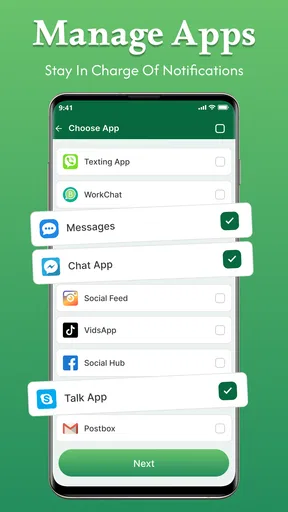
I would also pay attention to notification habits. A communication utility can become irritating if it duplicates alerts from the original messenger or encourages me to inspect the same conversation twice. My advice is to keep its role narrow: use it for previewing and reviewing, while continuing to send replies from the normal messaging app whenever that is the clearer experience.
Another maintenance issue is expectation management. Deleted-message recovery is only helpful when the app has had an opportunity to observe the relevant notification or message event. If I install it after something has already vanished, I should not expect it to reconstruct the past. Setting that expectation early prevents the most common disappointment.
Compatibility is reasonably broad because the app works on Android 7.0 and newer. That is useful for older devices, although people who use heavily customized Android software may still need to pay attention to how their phone handles background activity and notifications. I would check the app after installation rather than assuming that every phone will behave identically.
Where fatigue begins
The main source of fatigue is duplication. I already have a messaging app, its notifications, its read indicators, and possibly a built-in notification history. Adding UnseenChat introduces another layer to understand. At first that feels empowering; later it can feel like administrative work if I am constantly deciding which app to open.
There is also a risk of turning communication into surveillance of small changes. Deleted messages can be harmless corrections, accidental sends, or moments when someone simply changed their mind. Repeatedly checking them may create more anxiety than clarity. I think the app works best when it helps with practical context, not when it encourages me to investigate every disappearance.
The unseen-reading feature has a similar boundary. It is useful for managing timing, but it can weaken the natural rhythm of conversation if I rely on it to avoid every acknowledgment. I would use it when I genuinely need time, not as a permanent way to keep every chat at arm’s length.
The rating of 3.9 reflects that mixed picture: the central idea is attractive, while the day-to-day experience will depend heavily on device behavior, personal messaging volume, and expectations. I would not read that score as a reason to avoid the app, but I would take it as a reminder to test it against my actual routine rather than assuming the feature list guarantees lasting value.
Who should install it, and who should skip it
I would recommend UnseenChat: View Deleted Msgs to someone who regularly needs a pause before opening or answering chats. It is especially suitable for people in busy group conversations, users who often miss messages during work, and anyone who wants a convenient place for unseen previews and status saving. The app’s focus is clear enough that these users can quickly tell whether it fits their needs.
I would be more cautious with it for someone who wants a minimal phone setup, dislikes duplicate notifications, or rarely receives deleted messages. It is also not ideal for a person looking for a complete alternative to a mainstream messenger. The app supports a specific communication workflow; it does not replace the social and organizational features of the original chat service.
Privacy-minded users should make their own comfort judgment before using any tool that sits near personal messages. Even without turning the decision into a technical exercise, I would avoid installing it casually on a shared phone and would review the app’s behavior during the first few days. The right question is not only whether it can show more content, but whether that added access is worth the convenience in my own situation.
My long-term verdict
UnseenChat earns lasting space on my phone only when I have a recurring need for its narrow set of tools. Its first-week appeal is genuine: deleted-message viewing, unseen chat reading, and status saving address recognizable communication frustrations. The app can make busy days feel less reactive, especially when I want to understand a conversation before committing attention to it.
Its long-term weakness is that the same convenience can become another layer of checking. I would keep it if it helps me follow a clear routine: preview when necessary, return to the original messenger to reply, and save status content only when I have a reason to keep it. I would remove it if I found myself opening it out of curiosity, managing duplicate alerts, or expecting it to recover every message that disappears.
For a free communication app from Afex AI, it is worth trying when deleted messages and read indicators are genuine recurring annoyances. The Everyone age rating and broad Android compatibility make that trial accessible, while the optional purchases mean I would first establish whether the everyday workflow is valuable before paying for anything. My recommendation is therefore positive but conditional: keep it for a repeatable communication habit, not merely for the novelty of seeing what vanished.
Pros
- Recovers deleted text messages from supported chat notifications.
- Simple interface with quick access to captured conversations.
- Works without requiring access to your chat account credentials.
- Can preserve message history when notifications are dismissed.
- Useful for checking messages when you cannot open the chat immediately.
Cons
- Cannot recover messages deleted before the app was installed.
- Images
- videos
- and voice notes may not be restored reliably.
- Requires notification access
- which can expose sensitive message content.
- Battery use may increase while monitoring incoming notifications.
- Compatibility depends on the chat app and its notification settings.
FAQs for UnseenChat: View Deleted Msgs
What is UnseenChat: View Deleted Msgs and how does it work?
UnseenChat: View Deleted Msgs is designed to help users read certain incoming messages that may later be deleted by the sender. It generally relies on notification access to capture message previews when they first appear on your device. The app does not magically recover every deleted conversation, so its results depend on notification settings, supported messaging services, and whether the message was visible before deletion.
Can UnseenChat recover messages that were deleted before I installed it?
No. In normal use, UnseenChat cannot retrieve messages that disappeared before the application was installed, configured, and granted the necessary permissions. It works by recording information received through notifications, rather than accessing a messaging provider’s private servers or restoring an old backup. For the best chance of seeing deleted content, notification previews must be enabled while the original message arrives.
Which permissions does UnseenChat require, and are they safe to grant?
The application may request notification access, storage or media access, and other permissions depending on its features and your Android version. Notification access can expose message text, sender names, and notification details to the app, so it should only be enabled if you trust the developer and understand the privacy implications. Review the requested permissions, privacy policy, and device settings before continuing.
Will UnseenChat display deleted photos, videos, voice notes, or stickers?
Text messages are usually the easiest content for an app of this type to record because they can appear directly in notifications. Media files, voice messages, stickers, and disappearing content are less predictable. They may not be saved if notifications contain only a generic alert, if downloads are restricted, or if the messaging app hides previews. Results can also vary with device manufacturer and Android settings.
Does UnseenChat work with every messaging app and on iPhone?
Compatibility is not universal. UnseenChat’s functionality normally depends on Android notification access and on how each messaging application creates, groups, or hides notifications. Some services may work better than others, while encrypted, disappearing, or privacy-focused chats can limit what is captured. iPhone users should check the official store listing carefully, because iOS does not provide the same notification-monitoring access available on Android.


